Have you ever sent an important message and wondered whether the other person actually saw it? Whether you’re waiting for a reply from a friend, coworker, or family member, that uncertainty can be frustrating.
If you’ve been searching for how to tell if someone read your text on iPhone, the answer largely depends on Apple’s iMessage system and a feature called Read Receipts. In this guide, you’ll learn exactly how read receipts work, when they appear, why they sometimes don’t show up, and what other clues may indicate that your message has been seen.
Understanding Read Receipts on iPhone
The primary way to know whether someone has read your text is through Apple’s Read Receipts feature.
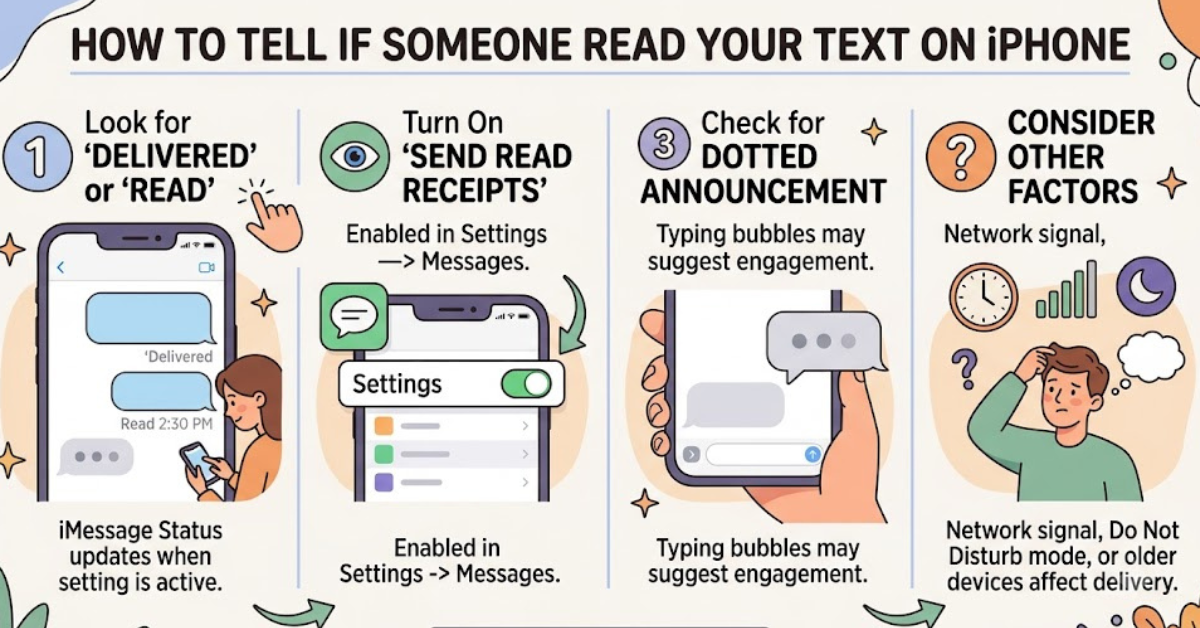
When enabled, read receipts notify the sender that the recipient has opened and viewed the message. Instead of simply showing “Delivered,” the conversation will display “Read” along with a timestamp.
What Is a Read Receipt?
A read receipt is a notification generated by iMessage that tells the sender when a message has been opened.
For example:
- Message sent at 2:00 PM
- Status changes to “Delivered” at 2:01 PM
- Status changes to “Read 2:15 PM” when the recipient opens the message
This is the clearest indicator that someone has read your text.
How to Tell If Someone Read Your Text on iPhone Using iMessage
Follow these steps:
- Open the Messages app.
- Select the conversation.
- Look beneath your most recent message.
You may see one of the following:
Delivered
“Delivered” means:
- The message successfully reached the recipient’s device.
- It does not necessarily mean they have opened it.
- Their phone may have received it while locked or inactive.
Read
“Read” indicates:
- The recipient opened the message.
- Read receipts are enabled on their device.
- The displayed time shows when the message was viewed.
If you see “Read,” there’s no guesswork involved—the message has been opened.
Why You May Not See a Read Receipt
Many people assume that a missing read receipt means their message hasn’t been seen. That’s not always true.
Several factors can prevent read receipts from appearing.
The Recipient Disabled Read Receipts
Apple allows users to control whether others can see when they’ve read messages.
If read receipts are turned off:
- You will only see “Delivered.”
- The recipient may have already read the message.
- There is no automatic way to confirm it.
This is one of the most common reasons people cannot determine whether someone has read their text.
You’re Sending an SMS Instead of an iMessage
Read receipts only work with iMessage.
You can identify message types by color:
- Blue bubbles = iMessage
- Green bubbles = SMS/MMS
If the conversation uses green bubbles:
- Read receipts are unavailable.
- Delivery information is limited.
- You cannot reliably see when the message was opened.
The Recipient Has No Internet Connection
iMessage requires internet access through:
- Wi-Fi
- Cellular data
If the recipient is offline:
- Messages may remain pending.
- Read receipts cannot update.
- Delivery status may be delayed.
Device Issues or Software Glitches
Occasionally, temporary issues can affect message statuses.
Examples include:
- Outdated iOS versions
- Network interruptions
- Apple server problems
- Device synchronization delays
In such cases, read receipts may appear later than expected.
How Read Receipts Work in iOS
Apple gives users significant control over privacy.
Global Read Receipts Setting
Users can enable or disable read receipts for all conversations.
To check:
- Open Settings.
- Tap Apps (or Messages, depending on iOS version).
- Select Messages.
- Find Send Read Receipts.
If enabled, others can see when messages are read.
Individual Conversation Settings
Modern versions of iOS allow read receipts for specific contacts.
A user can:
- Enable receipts for one person
- Disable them for another
- Customize privacy preferences
This means you might receive read receipts from one contact but not another.
Can You Tell If Someone Read a Text Without Read Receipts?
This is a common question, but the answer is limited.
Without read receipts, there is no official method to confirm that a message has been read.
However, some indirect signs may help.
They Start Typing
If you see the typing indicator (three animated dots):
- The person is actively viewing the conversation.
- They likely saw your latest message.
- They may be preparing a response.
Keep in mind that typing indicators can appear and disappear without a message being sent.
They Respond Quickly
A fast reply often suggests the message was read shortly after delivery.
For example:
- Message sent at 3:00 PM
- Reply received at 3:02 PM
While not proof, it strongly indicates the recipient viewed the conversation.
They Reference Your Message
If someone responds directly to information in your text, they have obviously read it, even if read receipts are disabled.
Difference Between Delivered and Read
Many iPhone users confuse these two statuses.
| Status | Meaning |
| Sent | Message is leaving your device |
| Delivered | Message reached recipient’s device |
| Read | Recipient opened the message |
| Not Delivered | Message failed to send |
Understanding this distinction helps avoid unnecessary assumptions.
A delivered message may sit unread for hours or even days.
How Group Chats Affect Read Receipts
Group conversations work differently from one-on-one chats.
iMessage Group Chats
In group chats:
- Read receipts generally aren’t displayed in the same way.
- Individual read statuses are usually hidden.
- You cannot easily determine which participant viewed the message.
SMS Group Messages
SMS group chats offer even less information.
You typically won’t receive:
- Read receipts
- Detailed delivery tracking
- Individual viewing confirmations
Common Myths About Reading Text Messages on iPhone
Many misconceptions exist regarding message tracking.
Myth 1: Delivered Means Read
This is false.
Delivered only confirms receipt by the device, not the person.
Myth 2: Third-Party Apps Can Reveal Read Messages
Many apps claim to track text activity.
In reality:
- Apple restricts message access.
- Apps cannot bypass privacy settings.
- Most claims are misleading.
Myth 3: Airplane Mode Prevents Read Status Forever
Airplane Mode can temporarily delay read receipt updates, but once the device reconnects, statuses may sync normally.
Privacy Considerations
Read receipts are designed to balance communication and privacy.
Some people leave them on because:
- It improves transparency.
- It reduces follow-up messages.
- It helps professional communication.
Others disable them because:
- They prefer privacy.
- They don’t want pressure to respond immediately.
- They manage many conversations.
Neither approach is right or wrong; it comes down to personal preference.
Practical Tips for Better Messaging Etiquette
Instead of focusing solely on read receipts, consider these communication habits:
- Avoid sending multiple follow-up messages immediately.
- Give people reasonable time to respond.
- Remember that reading doesn’t always mean availability.
- Respect privacy settings.
- Use urgent calls for time-sensitive matters.
These practices help maintain healthier digital communication.
Key Takeaways
- Read receipts are the most reliable way to know if someone read your text.
- The status “Read” confirms that the message was opened.
- “Delivered” only means the message reached the recipient’s device.
- Read receipts work only with iMessage, not SMS.
- Users can disable read receipts globally or for specific contacts.
- There is no official way to confirm a read message when receipts are turned off.
Frequently Asked Questions
How do I know if someone read my iPhone text message?
If the conversation uses iMessage and the recipient has read receipts enabled, you’ll see “Read” beneath your message along with a timestamp.
Why does my iPhone only say Delivered and not Read?
The recipient may have disabled read receipts, not opened the message yet, or the conversation may not support read receipts.
Can I see if someone read my text when read receipts are off?
No. Apple does not provide a way to verify message views when read receipts are disabled.
Do read receipts work for green text messages?
No. Green messages use SMS/MMS rather than iMessage, and read receipts generally aren’t available.
Can someone read my message without triggering a read receipt?
If read receipts are disabled, yes. If enabled, opening the message typically triggers a read receipt.
Why do some contacts show read receipts while others don’t?
iPhone users can customize read receipt settings per conversation, so one contact may share read status while another does not.
Conclusion
Understanding how to tell if someone read your text on iPhone starts with knowing how iMessage and read receipts work. When the “Read” status appears, you can be confident the recipient opened your message. However, if you only see “Delivered,” it doesn’t necessarily mean the text went unread—it may simply reflect the recipient’s privacy settings.
By understanding the difference between delivered and read statuses, recognizing the limitations of SMS messages, and respecting individual privacy choices, you’ll have a much clearer picture of how message tracking works on iPhone. Apply these insights the next time you’re waiting for an important response, and you’ll avoid much of the uncertainty that comes with modern texting.