Have you ever visited a website and wondered who owns it, who wrote the content, or which organization is behind it? Whether you are verifying information, checking a source for research, contacting a website owner, or evaluating a business, knowing how to find publisher of website can be extremely useful.
The good news is that websites often leave many digital clues behind. From “About Us” pages and domain registration records to copyright notices and online databases, there are several reliable ways to identify a website’s publisher. In this guide, you’ll learn practical methods to uncover website ownership and determine whether a source is trustworthy.
What Does the Publisher of a Website Mean?
A website publisher is the person, company, organization, or institution responsible for creating, managing, and distributing the content on a website.
For example:
- A news website may be published by a media company.
- A company website is usually published by the business itself.
- An educational website may be operated by a university or research institution.
- A personal blog is typically published by an individual author.
Finding the publisher helps you understand the credibility, purpose, and authority of the information presented online.
Check the Website’s About Us Page
One of the easiest ways to find the publisher of a website is by visiting the About Us page.
Most legitimate websites include information about:
- The organization behind the site
- Company history
- Editors or authors
- Mission and values
- Business location and contact details
Look for menu items such as:
- About
- Our Team
- Company Information
- Editorial Team
- Who We Are
For instance, a news website may list its parent company, chief editor, and editorial staff, making it simple to identify the publisher.
Look for the Contact Page
Another effective method for finding website ownership details is checking the contact section.
The contact page may include:
- Company name
- Email address
- Physical address
- Telephone number
- Customer support information
Professional websites often display the legal name of the business responsible for operating the site.
Check the Website Footer
Many websites reveal publisher information at the bottom of every page.
Scroll down and look for:
- Copyright statements
- Company names
- Legal notices
- Privacy policies
- Terms and conditions
You might see a notice such as:
© 2026 ABC Media Group. All rights reserved.
In this case, ABC Media Group is likely the publisher or owner of the website.
Use a WHOIS Domain Lookup Tool
If the website does not clearly identify its publisher, a WHOIS search can provide useful domain information.
WHOIS records may reveal:
- Domain owner or organization
- Registration date
- Domain registrar
- Administrative contact details
However, many website owners use domain privacy protection services, which may hide personal information.
Even when details are private, WHOIS can still reveal clues such as the registrar or the country where the domain was registered.
Search the Website’s Privacy Policy or Terms of Service
Legal pages are another valuable source when researching who publishes a website.
Check pages labeled:
- Privacy Policy
- Terms of Service
- Terms and Conditions
- Legal Information
These documents often mention the company or entity responsible for collecting data and managing the website.
For example, a statement like:
“This website is operated by XYZ Technologies Ltd.”
clearly identifies the publisher.
Use Search Engines to Investigate the Website
A simple search can uncover information not directly displayed on the website.
Try searching:
- Website name + owner
- Website name + company
- Website name + publisher
- Website name + contact information
Search engines may show business profiles, news articles, interviews, or public records connected to the website.
Check Social Media Profiles
Many websites maintain official accounts on platforms such as:
- X (formerly Twitter)
- YouTube
These profiles often list:
- Company details
- Business addresses
- Team members
- Organization names
A verified social media profile can also help confirm that a website is connected to a legitimate publisher.
Examine the Website’s Author Information
Blogs, magazines, and news sites often include author profiles.
Click on:
- Author names
- Writer biographies
- Editorial pages
You may discover:
- The individual who wrote the content
- The editorial organization
- The media company managing the website
This is especially useful when evaluating articles, academic resources, or online publications.
Use Business Databases and Public Records
For commercial websites, public databases may provide ownership information.
You can check:
- Company registration databases
- Business directories
- Trademark records
- Industry listings
These sources can help verify whether the publisher is a registered company or organization.
Analyze the Website’s Domain and Branding
Sometimes the website itself provides strong clues about its publisher.
Pay attention to:
- The domain name
- Company logos
- Brand names
- Product information
- Advertising disclosures
For example, a website with a domain matching a well-known company’s brand is often operated by that company or an affiliated organization.
How to Determine Whether a Website Publisher Is Trustworthy
Finding the publisher is only the first step. You should also evaluate their credibility.
Consider the following:
Check Transparency
Reliable publishers usually provide clear information about who they are and how to contact them.
Review Their Reputation
Look for reviews, news coverage, and independent discussions about the organization.
Examine Content Quality
Trustworthy websites generally publish accurate information, cite reliable sources, and maintain professional standards.
Watch for Warning Signs
Be cautious if a website:
- Has no author or company information
- Uses misleading claims
- Hides contact details
- Contains excessive advertisements or suspicious content
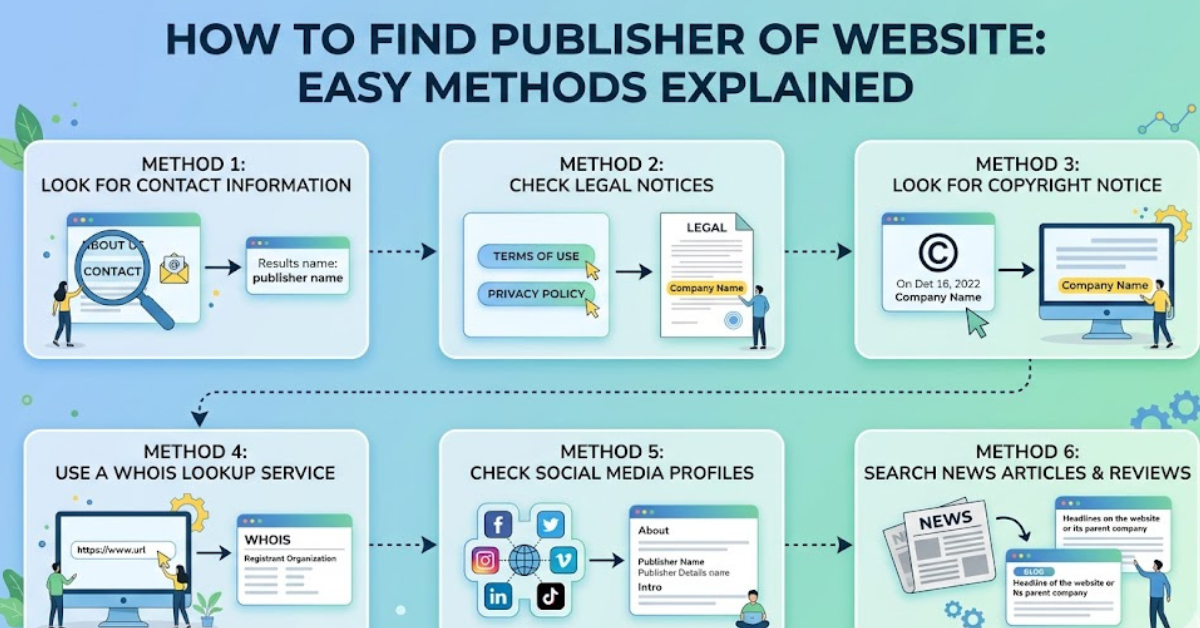
Quick Summary: Ways to Find a Website Publisher
Here are the most effective methods:
- Visit the About Us page.
- Check the Contact section.
- Look at the website footer.
- Review copyright information.
- Perform a WHOIS domain lookup.
- Read the Privacy Policy and Terms pages.
- Search the website name online.
- Review official social media accounts.
- Check author and editorial pages.
- Verify business records.
Using several methods together provides the most accurate results.
Frequently Asked Questions
How can I find who published a website?
You can identify who published a website by checking the About page, contact information, footer, legal pages, and domain registration records. These sources often reveal the individual or organization responsible for the site.
Is the website owner the same as the publisher?
Not always. The owner controls the website, while the publisher may be the company, media organization, or individual responsible for creating and managing the content.
Can I find a website publisher using WHOIS?
Yes, a WHOIS lookup can sometimes show the domain owner and registration details. However, privacy protection services may hide personal information.
How do I find the publisher of a website for a citation?
For citations, check the website’s About page, copyright notice, author information, or organization name displayed in the footer. These details are commonly accepted as the publisher.
What if a website does not show who published it?
If no publisher information is available, use search engines, social media profiles, business records, and domain data to gather clues. A lack of transparency may also indicate that the website should be treated cautiously.
Conclusion
Learning how to find publisher of website is an important skill for students, researchers, journalists, marketers, and everyday internet users. By checking the About page, legal information, domain records, social media profiles, and public databases, you can uncover who is responsible for a website and better judge its credibility.
Before trusting information online, take a few extra minutes to investigate the source. These simple research habits can help you identify reliable websites, avoid misinformation, and make better decisions on the internet.